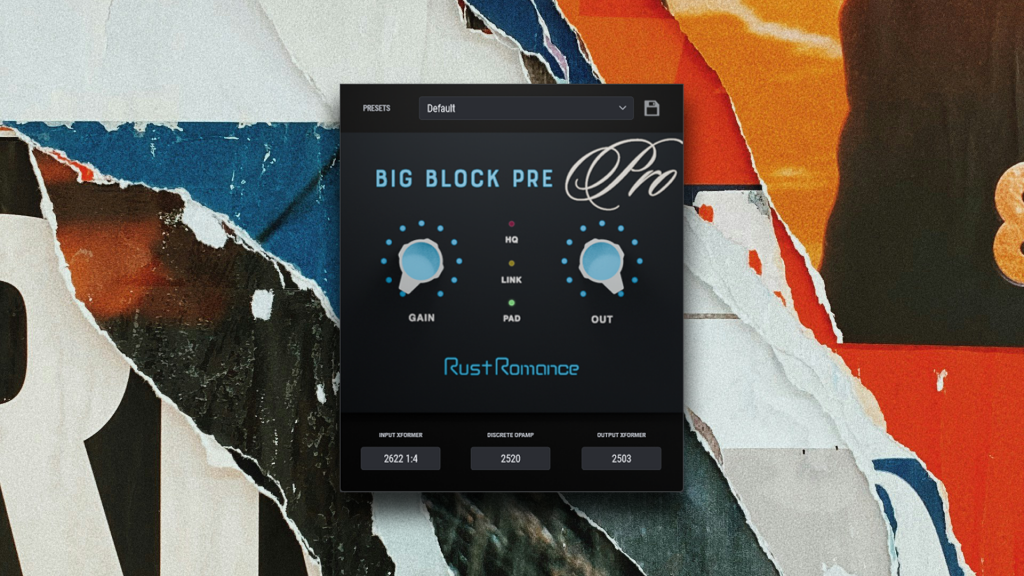
BigBlockPre Pro – Socketable Discrete Console Preamp VST
€14
Sale price valid through September 30, 2026
A socketable discrete preamp with swappable transformers and five classic-style op-amps — build your own console flavour for weight, punch, colour, or cleaner headroom.
Change the socket. Change the console.
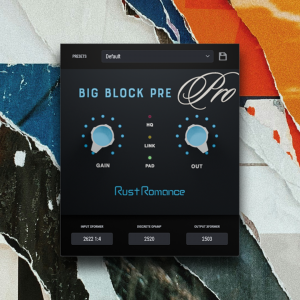
BigBlockPre Pro is a socketable discrete preamp plug-in inspired by the classic API 312 approach to console design. Choose the input transformer, discrete op-amp, and output transformer to build the signal path you want inside a single plug-in.
Go from the familiar 2520-style punch of the LE edition to different amplifier and transformer combinations for smoother, harder, denser, cleaner, or more colourful responses.
Windows VST3 · macOS VST3 / AU · Apple Silicon native
Build Your Console
BigBlockPre Pro is not an emulation of one specific console channel. It is a discrete preamp architecture you can rebuild from the inside.
The signal path has three main socketable stages:
- Input Transformer — choose between different transformer characters before the amplifier stage
- Discrete Op-Amp — choose from 2520, 1731, 990, AM10, and OA10 style amplifier designs
- Output Transformer — choose the transformer character at the final output stage
Change one part or rebuild the entire channel. Different combinations change the way the plug-in responds to level, saturation, frequency content, and transients.
More Than Different Flavours
Changing the DOA changes more than the tone.
Each amplifier design has its own gain behaviour, headroom, saturation character, and frequency response. That means the same GAIN setting can behave differently depending on which DOA is loaded.
The transformers add another layer of variation, changing how the signal is loaded, coloured, and driven before and after the amplifier.
The result is less like choosing a preset and more like changing the hardware inside the console.
One Plug-In, Different Jobs
Build a punchier chain for drums, a denser path for bass, something smoother for vocals, or a more coloured combination for synths and samplers.
Instead of loading several different preamp plug-ins for different sources, BigBlockPre Pro lets you create those variations inside one slot.
Controls
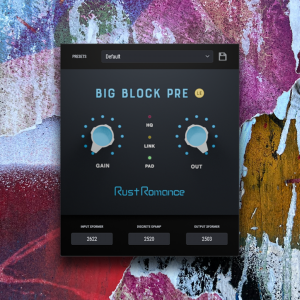
- PAD — reduces the level hitting the input stage and gives you more room to control how the circuit is driven.
- GAIN — drives the currently selected discrete amplifier and the rest of the signal path. Its response changes with the loaded DOA.
- OUTPUT — passive output attenuation. Use it to bring the level back down after driving the circuit.
- LINK — links GAIN and OUTPUT in opposite directions, making it easy to push the circuit harder while keeping the output level under control.
- Input Transformer — selects the transformer used at the input of the signal chain.
- DOA — selects the discrete op-amp used in the amplifier stage.
- Output Transformer — selects the transformer used at the output of the signal chain.
- Engine — choose between High Quality and FAST processing. FAST is the default for lower CPU use.
- Presets — save and recall the complete console configuration, including socket choices and control settings.
High Quality and FAST
BigBlockPre Pro includes two processing modes.
- High Quality — the full-quality processing mode for maximum accuracy.
- FAST — a lower-CPU mode designed to stay perceptually close to High Quality during normal use.
FAST is the default and is ideal when using BigBlockPre Pro across many channels. Switch to High Quality when you want the highest-quality processing on important tracks or busses.
LE vs Pro
BigBlockPre LE gives you one finished discrete console chain built around a 2622-style input transformer, 2520-style discrete op-amp, and 2503-style output transformer.
BigBlockPre Pro opens the sockets and lets you change the transformers and amplifier yourself.
If you want one great console channel, LE is free and complete as it is.
If you want to build different console characters for different sources, Pro is the full version.
System Requirements
- Windows: Windows 10 or 11, 64-bit
- Windows format: VST3
- macOS — Apple Silicon: macOS 11.0 (Big Sur) or later
- macOS — Intel: macOS 10.13 (High Sierra) or later
- Mac architecture: Universal Binary, native Apple Silicon and Intel support
- Mac formats: VST3 and AU
- Sample rates: 44.1, 48, 88.2, 96, 176.4, and 192 kHz
- Compatible VST3 or AU host required
- Internet connection required for initial license activation
- License can be activated on up to two machines
The macOS version is distributed as an Apple-notarized installer and runs natively on both Apple Silicon and Intel Macs.
v1.0.0 — Initial release. WDF-based AP2622 → 2520 → AP2503 chain, WDF and FAST engine modes, PAD / LINK / GAIN / OUTPUT controls, and preset management.
Pro is the socketable version of BigBlockPre. LE ships one fixed channel; Pro lets you swap the input transformer, the discrete op-amp, and the output transformer inside the plug-in. Every combination is a different console channel.
The input transformer, the DOA (discrete op-amp: 2520, 1731, 990, AM10, OA10), and the output transformer are all selectable. Each part is modelled at the circuit level with its own rails, feedback network, and saturation topology.
Yes. The GAIN knob drives the trim resistor in the DOA feedback network, and the closed-loop gain law is set by the DOA itself. A 2520 does not run out of clean gain in the same place a 990 does. A 1731 does not colour the top end the way an OA10 does. Same knob, different amplifier, different feel.
High Quality is the reference audio path, built directly from the circuit and winding data of every part. FAST is a lighter version derived from the same reference; it stays perceptually close on typical program material at a fraction of the CPU. FAST is the default. Switch to High Quality when you want the reference path on a mix bus or a difficult source.
No. It is a console that does not exist. It is built out of the components that shape the API 312 sound (an AP2622 style input transformer, a 2520 discrete op-amp, an AP2503 style output transformer), and in Pro extended with related discrete op-amps and transformers, but the assembled channel is our own.
Any 64-bit VST3 host on Windows 10 or 11, or macOS. Supported sample rates: 44.1, 48, 88.2, 96, 176.4, and 192 kHz.