BigBlockPre — An API-Style Preamp Plugin with Selectable Key Components
BigBlockPre is a preamp plugin built around the concept of an API 312-style preamp.
It can be used for everything from adding the slightest hint of texture to aggressive saturation and even heavy distortion by pushing the GAIN hard.
One of the biggest features of BigBlockPre is that you can choose the key components that make up the preamp itself.
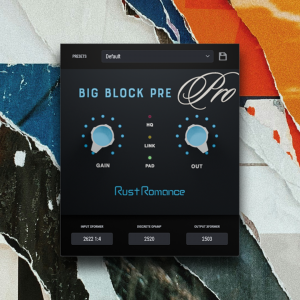
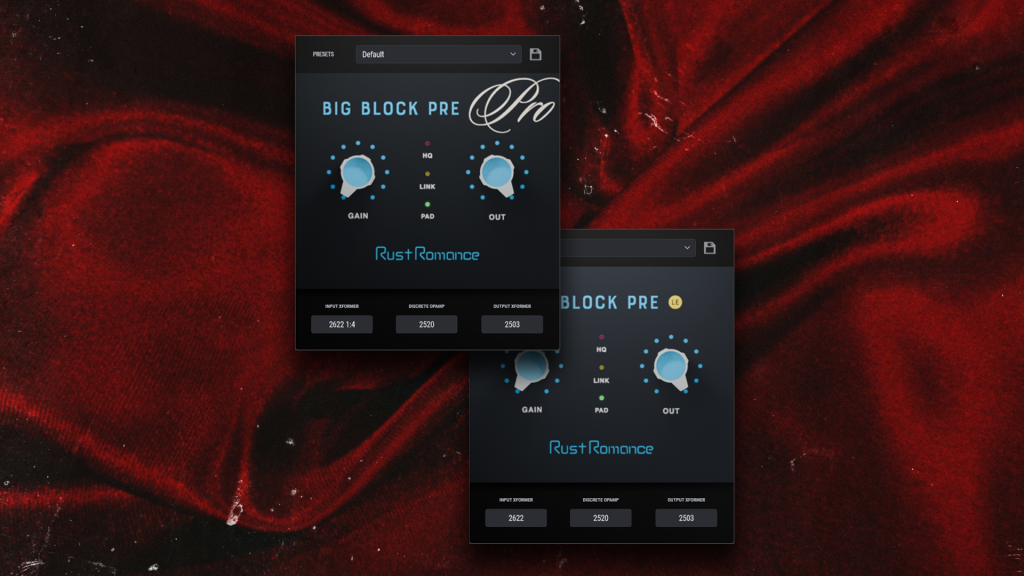
In BigBlockPre Pro, three major sections of the signal path can be selected independently:
Input Transformer → Discrete Op-Amp → Output Transformer
Rather than simply choosing between several finished preamp models, BigBlockPre lets you shape the sound by combining the components that make up the preamp itself.
Choose the Three Key Components of the Preamp
The sound of an analog preamp is not determined by a single component.
The Input Transformer receives the incoming signal.
The Discrete Op-Amp amplifies it.
The Output Transformer handles the final output stage.
The interaction between these components plays a major role in defining the overall character of a preamp.
BigBlockPre Pro lets you select each of these three sections independently.
For example, you can create combinations such as:
- an API-style Input Transformer
- a 990-style Discrete Op-Amp
- a Jensen-style Output Transformer
These are combinations that may never have existed in an actual hardware unit.
Of course, you can also stay close to classic American console designs by building a signal path primarily from API-style components.
“What would happen if I combined this transformer with this op-amp?”
BigBlockPre is designed to let you explore exactly that kind of component swapping—something that would be difficult, expensive, or impractical to experiment with in hardware.
Five Discrete Op-Amp Styles
One of the most significant sources of sonic variation in BigBlockPre Pro is the Discrete Op-Amp, or DOA.
The current version includes five different styles:
- API 2520-style
- Melcor 1731-style
- John Hardy 990-style
- Quad Eight AM10-style
- Neumann OA10-style
The differences between them go beyond simply changing the amount or color of distortion.
Depending on the model you choose, the headroom, transient response, saturation point, and behavior under heavy drive can all change.
For example, the 990-style model is designed to offer particularly wide headroom, with a clean, fast, and open character compared with the other models.
Switch to a 2520-style or 1731-style model, and the same source at the same GAIN setting can respond in a noticeably different way.
In other words, BigBlockPre Pro does not simply let you choose a different tone.
It lets you choose:
“How should this preamp react as I turn up the GAIN?”
Selectable Input Transformers
BigBlockPre Pro also includes multiple Input Transformer models.
The core AP2622-style transformer is available in both 1:4 and 1:8 configurations, giving you different gain structures at the input stage.
Additional options include:
- Jensen-style
- Lundahl-style
The difference between the 1:4 and 1:8 classes is not merely a change in tone. They also behave differently as part of the preamp’s gain structure.
BigBlockPre uses input circuitry designed around each transformer class, so changing the Input Transformer can alter the overall behavior of the preamp—not just its frequency response or coloration.
The Output Transformer Is Part of the Sound Too
Multiple Output Transformer styles are also available in BigBlockPre Pro.
The current selection includes:
- AP2503-style
- UTM-style
- Jensen-style
- CineMag-style
- Peerless / Altec-style
By combining different Output Transformers with different Discrete Op-Amps and Input Transformers, BigBlockPre can produce a much wider range of sounds than a plugin based around selecting complete preamp models.
You can stay within an American console-inspired combination, or mix in European-inspired components such as a Lundahl-style transformer or an OA10-style Discrete Op-Amp.
And there is no requirement to stay historically accurate.
Creating a preamp that never existed is part of the fun of BigBlockPre Pro.
From Subtle Texture to Heavy Distortion
BigBlockPre is not limited to adding a gentle sense of “analog character.”
Lower the OUTPUT while pushing the GAIN hard, and you can drive the internal preamp stages into obvious saturation or even aggressive distortion.
This can be especially effective on drums, bass, samples, and synthesizers when you want more weight, presence, or attitude.
At the other end of the spectrum, BigBlockPre can also be used when you do not want obvious distortion at all—only a very slight change in texture.
BigBlockPre includes PAD and LINK controls for this purpose.
With PAD enabled, you can increase the GAIN while LINK moves the OUTPUT in the opposite direction, helping you increase the internal drive while keeping the final output level under control.
Even when the result does not sound obviously “distorted,” subtle changes can still appear in the transients, density, and the way the sound sits in a mix.
BigBlockPre can be used as an obvious sound-design effect, or as a very subtle source of texture.
It was designed to do both.
Try It on a Drum Bus
One of our favorite uses for BigBlockPre is on a drum bus.
Insert it on a drum mix that feels like it needs a little more punch, then slowly raise the GAIN.
As you drive the preamp harder, the transient character, density, harmonic content, and sense of forward movement begin to change.
You can push it aggressively and make the coloration obvious, or use only a small amount of drive to add texture without dramatically changing the sound.
With BigBlockPre Pro, you can go even further by changing the Discrete Op-Amp and Transformer combination.
That means you are not only deciding how much punch to add.
You can also decide what kind of punch you want.
Do you want to keep the sound clean while making it feel more forward?
Do you want something rougher?
Do you want to emphasize the sense of attack?
The preamp itself can be configured around the source.
Use It Across Tracks Like a Virtual Console
Another interesting approach is to place BigBlockPre at the end of multiple individual tracks.
Insert it on your Kick, Snare, Bass, Synth, Vocal, and other channels, and BigBlockPre can be used almost like a virtual discrete console inside your DAW.
With the Pro version, every track does not need to use the same configuration.
For example:
Kick with a 2520-style DOA.
Bass with a 990-style DOA.
Vocal with an OA10-style DOA.
You can also choose different Input and Output Transformers for each track.
Rather than recreating a single existing console, you can build the preamp that each individual track needs as you mix.
That is another way BigBlockPre can be used differently from a conventional preamp emulation.
BigBlockPre LE — Free Version Available
BigBlockPre is available in two editions:
BigBlockPre Pro and BigBlockPre LE.
BigBlockPre LE is free.
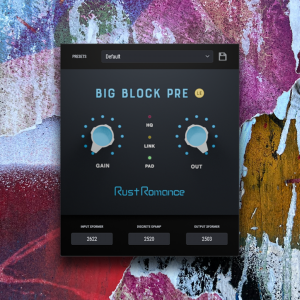
The LE version removes the component-selection system and uses a fixed API-style signal chain:
AP2622-style Input Transformer
→ 2520-style Discrete Op-Amp
→ AP2503-style Output Transformer
However, the sound itself has not been simplified simply because LE is free.
The API-style signal chain that became the foundation of BigBlockPre is the same core chain used in the LE version.
This means that although LE does not offer the wide range of component combinations available in Pro, it still works as a fully usable API-style preamp plugin in its own right.
This may sound a little self-congratulatory, but:
we think giving this one away for free is pretty generous.
Try BigBlockPre LE on drums, bass, samples, or a mix bus and start turning the GAIN.
If you like the basic sound and response of BigBlockPre, the Pro version takes the concept further by allowing you to swap the Input Transformer, Discrete Op-Amp, and Output Transformer to build your own preamp configurations.
Don’t Just Choose a Preamp. Build One.
BigBlockPre is not designed simply to recreate one specific piece of vintage hardware.
It starts with the architecture of an API-style preamp, then makes its major internal components selectable so that you can create a much broader range of sounds.
Which Input Transformer should receive the signal?
Which Discrete Op-Amp should amplify it?
Which Output Transformer should send it back out?
By choosing each stage yourself, you can explore one simple question:
“What would this preamp sound like if these components had actually been built together?”
BigBlockPre lets you find out by listening.